SEcMS란 무엇인가?
What is SEcMS?
SEcMS(Shipboard Electrical Cable Management System)는 선박 전기 엔지니어를 위한 클라우드 SaaS입니다. 무거운 대형 3D CAD 없이도 선급 검증을 통과하는 케이블 설계 작업 전체를 브라우저에서 처리합니다.
SEcMS (Shipboard Electrical Cable Management System) is a cloud SaaS for marine electrical engineers. Handle the entire cable design workflow — pass class society verification without heavyweight 3D CAD suites — directly in the browser.
빠른 경로계산
Fast Routing
자동 라우팅 엔진. 대규모 호선도 빠르게 처리.
Auto-routing engine. Large-scale vessels processed quickly.
8선급 자동 검증
8-Class Auto Validation
DNV·LR·BV·ABS·NK·KR·RINA·CCS 규정 동시 적용. 클릭 한 번으로 선급 보고서.
DNV·LR·BV·ABS·NK·KR·RINA·CCS rules applied simultaneously. One-click class society report.
BOM 완전 자동화
Full BOM Automation
경로 완료 후 자재발주서 5초 생성. Excel 다운로드.
Generate material orders in 5 seconds post-routing. Excel export.
트레이 물리 시뮬레이션
Tray Physics Simulation
IEC 기준 충전율 계산 + 드래그 배치 시각화.
IEC fill-rate calculation + drag-and-drop layout visualization.
멀티사용자 동시작업
Multi-user Collaboration
낙관적 잠금 + 충돌 감지. 팀 전원 동시 편집 가능.
Optimistic locking + conflict detection. Full team simultaneous editing.
설치 불필요
Zero Installation
Chrome·Edge·Safari. 서버·라이선스·설치 없음.
Chrome·Edge·Safari. No server, license, or installation.
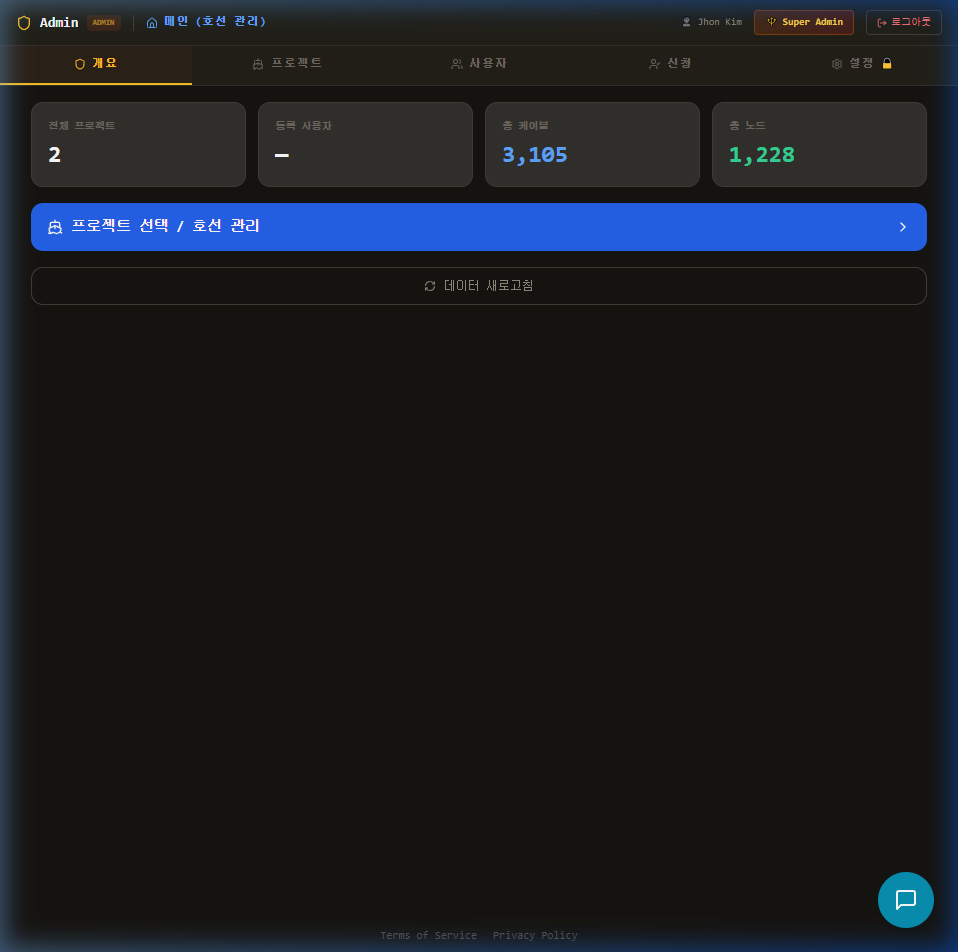
시스템 접근 방법
How to Access the System
secms.pages.dev 접속
Go to secms.pages.dev
Chrome 또는 Edge 브라우저 권장. 설치 불필요.
Chrome or Edge recommended. No installation needed.
Google 계정으로 로그인
Sign in with Google
기존 Google 계정을 사용합니다. 별도 가입 불필요.
Use your existing Google account. No separate sign-up needed.
초대 코드 입력 (신규 사용자)
Enter Invite Code (new users)
관리자로부터 받은 초대 코드를 입력합니다. 코드 없으면 승인 신청 후 24시간 내 이메일 발송.
Enter the invite code from your admin. No code? Request access — email sent within 24h.
프로젝트 화면 진입
Enter Project Screen
승인 완료 후 프로젝트 목록 화면으로 자동 이동합니다.
After approval, you'll be taken to the project list automatically.
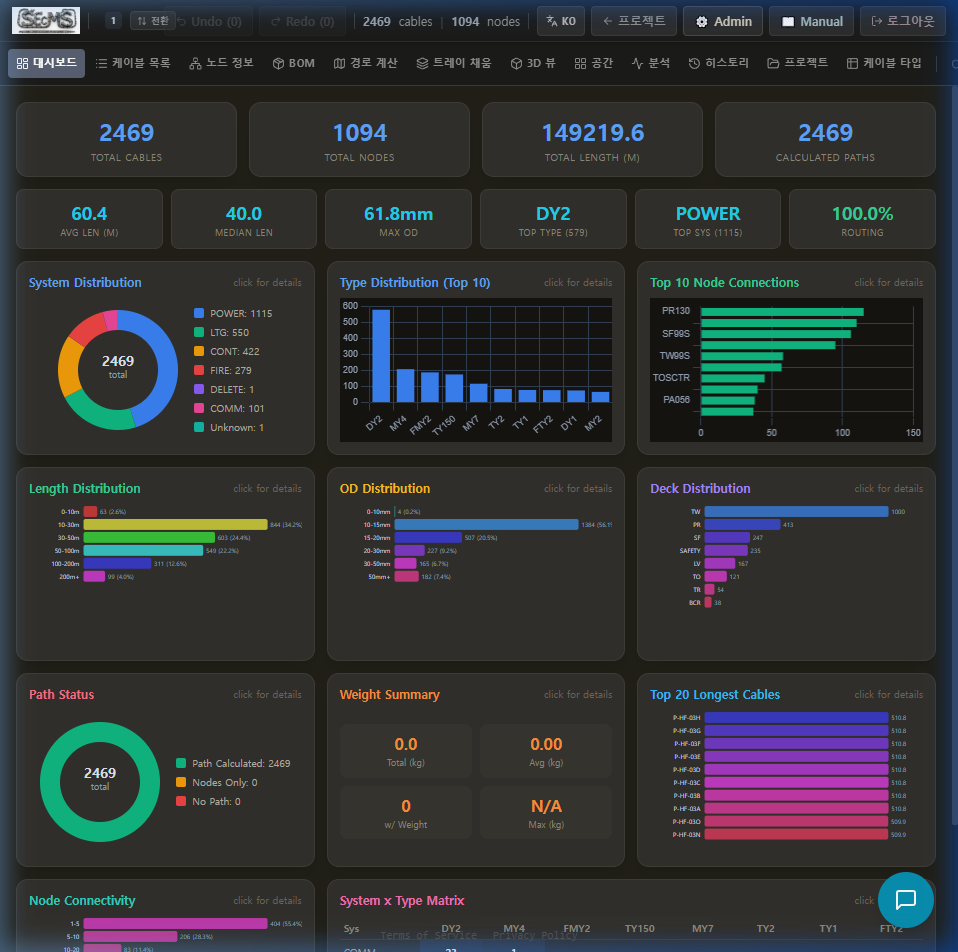
호선 단위 프로젝트
Vessel-Based Projects
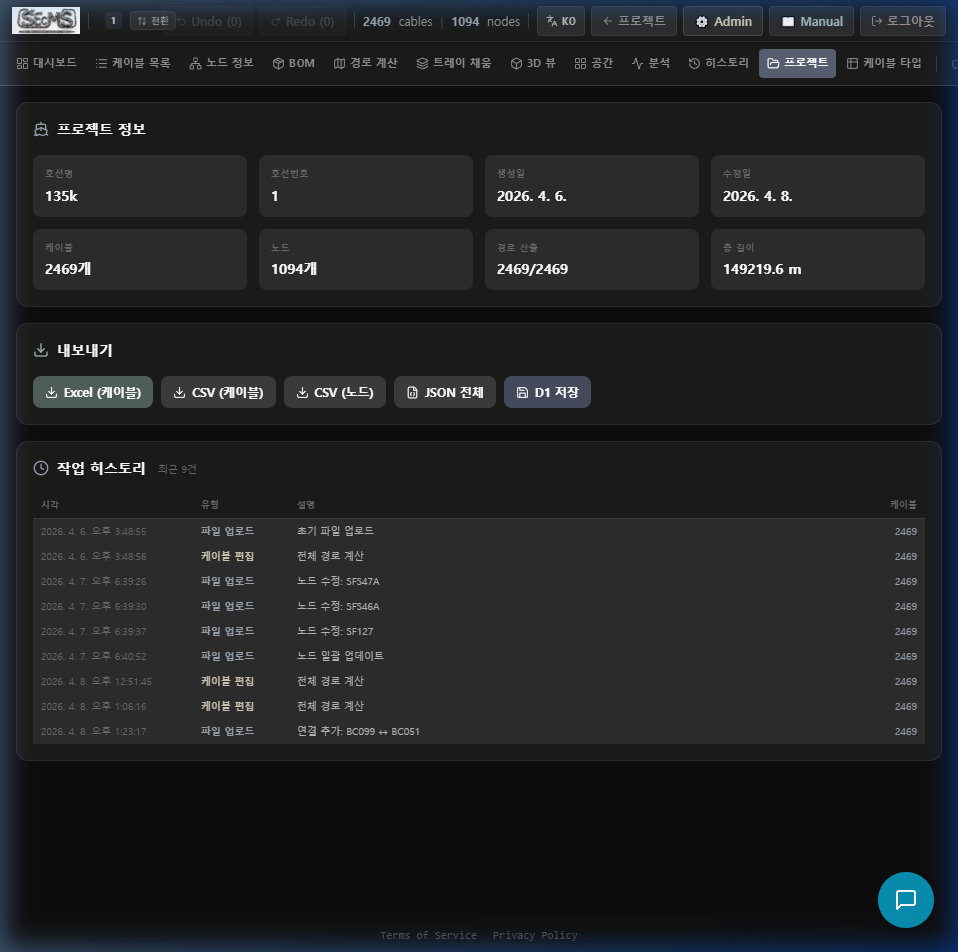
각 프로젝트는 하나의 호선을 의미합니다. 프로젝트별로 케이블·노드·BOM·히스토리가 독립 저장됩니다.
Each project represents one vessel. Cables, nodes, BOM, and history are stored independently per project.
새 프로젝트 만들기
Create New Project
"+ 새 프로젝트" 클릭 → 호선명 입력 (호선번호 선택) → Excel 파일 드래그 또는 나중에 업로드 가능.
Click "+ New Project" → enter vessel name (vessel number optional) → drag Excel files or upload later.
프로젝트 열기
Open a Project
프로젝트 카드 클릭 → 메인 작업 화면으로 이동.
Click the project card → navigate to the main work screen.
동시 편집 & 충돌 처리
Simultaneous Editing & Conflict Handling
다른 팀원이 같은 프로젝트를 저장하면 충돌 배너가 표시됩니다. "강제 저장" (내 변경 우선) 또는 "서버 데이터로 새로고침" 선택.
If a teammate saves the same project, a conflict banner appears. Choose "Force Save" (keep your changes) or "Reload from Server".
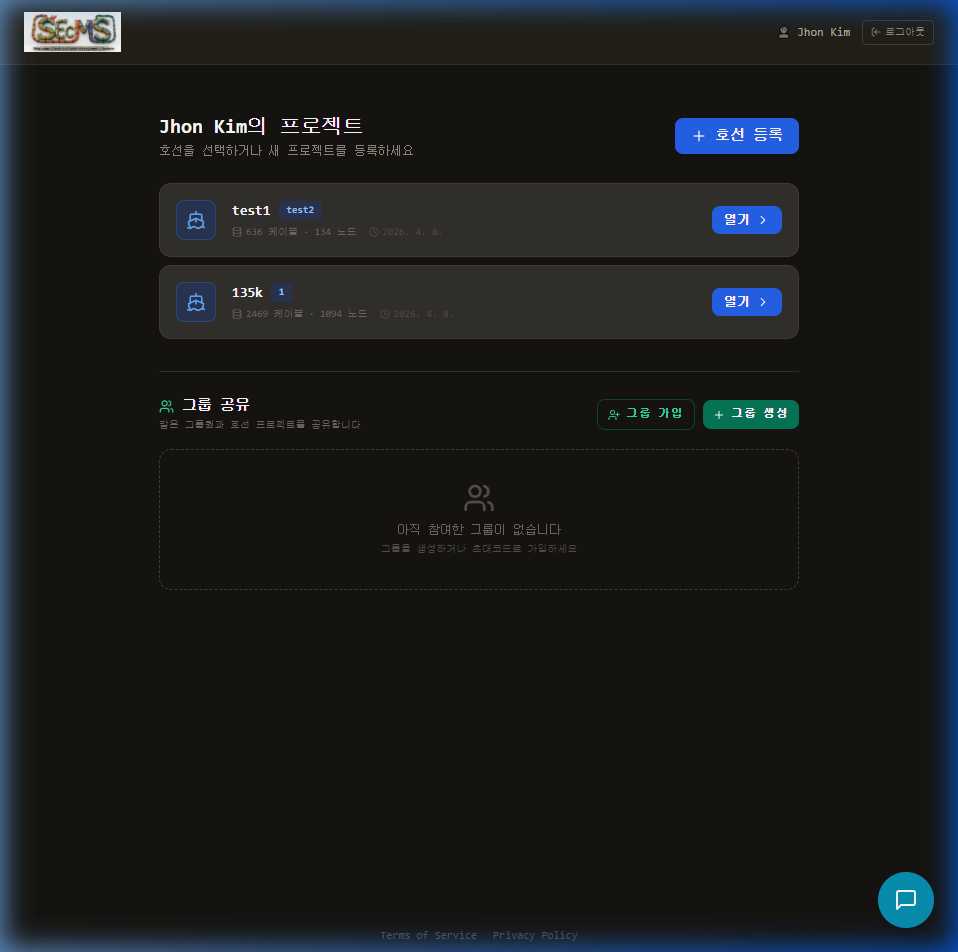
케이블·노드 데이터 불러오기
Import Cable & Node Data
SEcMS는 어떤 형식의 엑셀 파일도 받아들입니다. 내부 표준 포맷으로 자동 변환되며, 알 수 없는 컬럼은 컬럼 매퍼가 처리합니다.
SEcMS accepts Excel files in any format. They are auto-converted to the internal standard, and unknown columns are handled by the Column Mapper.
케이블 리스트 (xlsx)Cable List (xlsx)
드래그 또는 클릭 Drag or click
노드 정보 (xlsx)Node Info (xlsx)
드래그 또는 클릭 Drag or click
케이블 Excel 표준 컬럼
Cable Excel Standard Columns
| SEcMS 필드 | SEcMS Field | 인식하는 헤더 이름 (예시) | Recognized Header Names (examples) | 필수 | Required |
|---|---|---|---|---|---|
| name | CABLE_NAME · NAME · Cable Name | ||||
| type | CABLE_TYPE · TYPE · Type | ||||
| fromNode | FROM_NODE · FROM · From Node | ||||
| toNode | TO_NODE · TO · To Node | ||||
| outDia (OD) | CABLE_OUTDIA · OD · DIA · DIA_MM | 권장 | Recommended | ||
| length | POR_LENGTH · LENGTH · Length | 권장 | Recommended | ||
| system | CABLE_SYSTEM · SYSTEM | - | - | ||
| path | CABLE_PATH · PATH | - | - |
사내 엑셀 포맷 그대로 사용하기
Use Your Own Excel Format
표준 헤더와 다른 사내 고유 열 이름을 사용하는 경우, 컬럼 매퍼가 자동으로 열립니다. 한 번 설정하면 저장되어 다음 업로드 시 자동 적용됩니다.
If your company uses non-standard column headers, the Column Mapper opens automatically. Configure it once — the profile is saved and auto-applied on future uploads.
수만 가닥을 손쉽게 관리
Manage Tens of Thousands of Cables
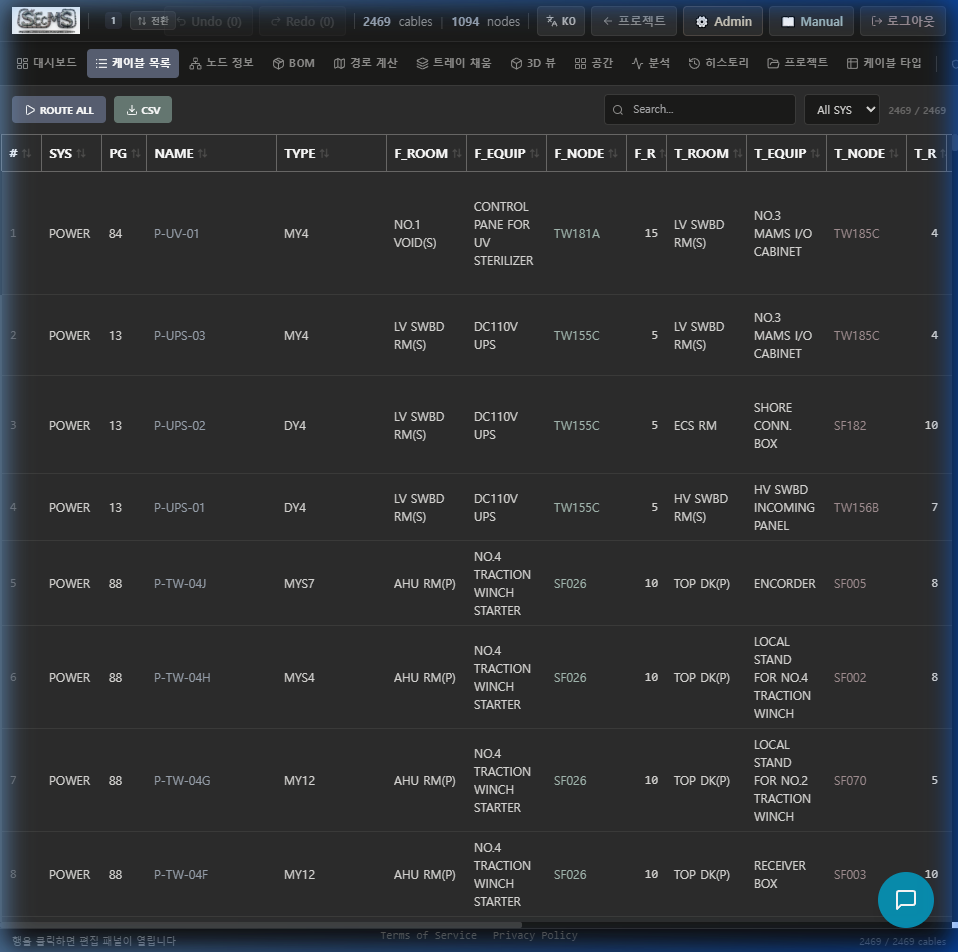
실시간 검색·필터
Real-time Search & Filter
이름·타입·노드·시스템별 즉시 필터링. 대용량에서도 지연 없음.
Instant filter by name, type, node, system. No lag on large datasets.
인라인 편집
Inline Editing
셀 클릭 → 직접 수정. 저장은 자동 (프로젝트 자동 저장).
Click cell → edit directly. Auto-saved with project auto-save.
다중 선택 라우팅
Multi-select Routing
체크박스로 원하는 케이블만 선택 후 "선택 경로계산" 실행.
Check specific cables then run "Route Selected".
선박 구조를 그래프로 모델링
Model Ship Structure as a Graph
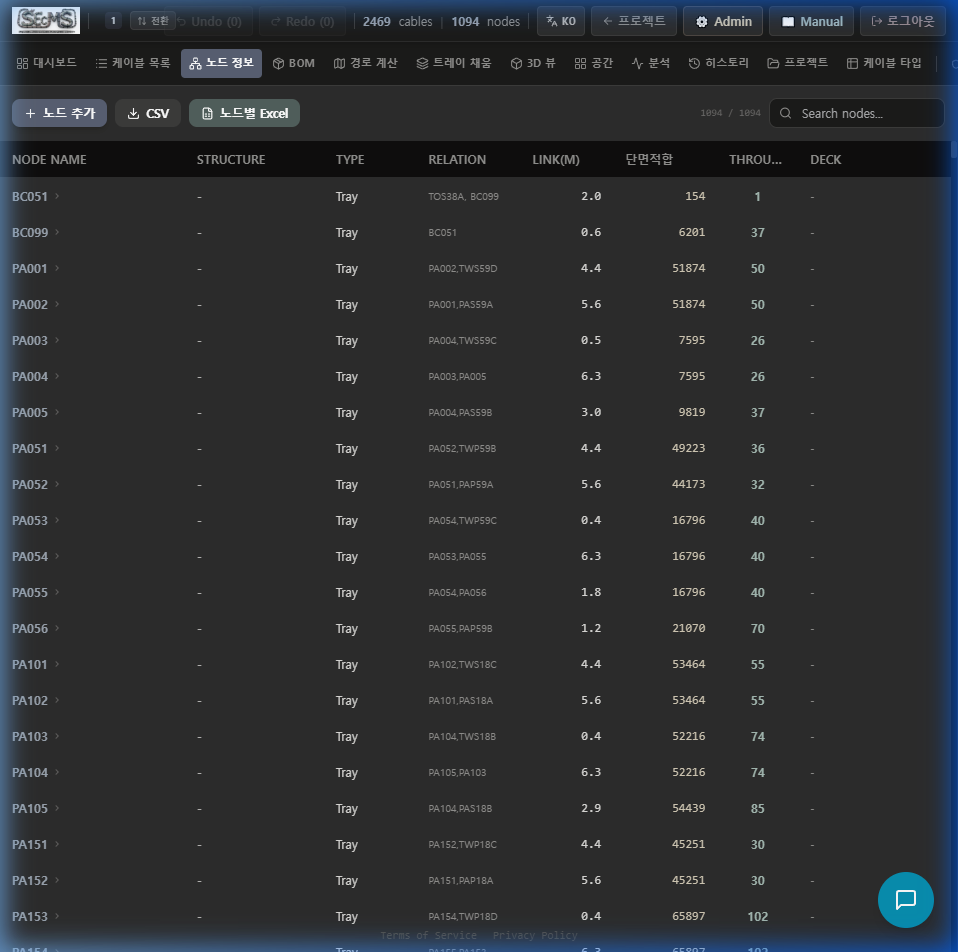
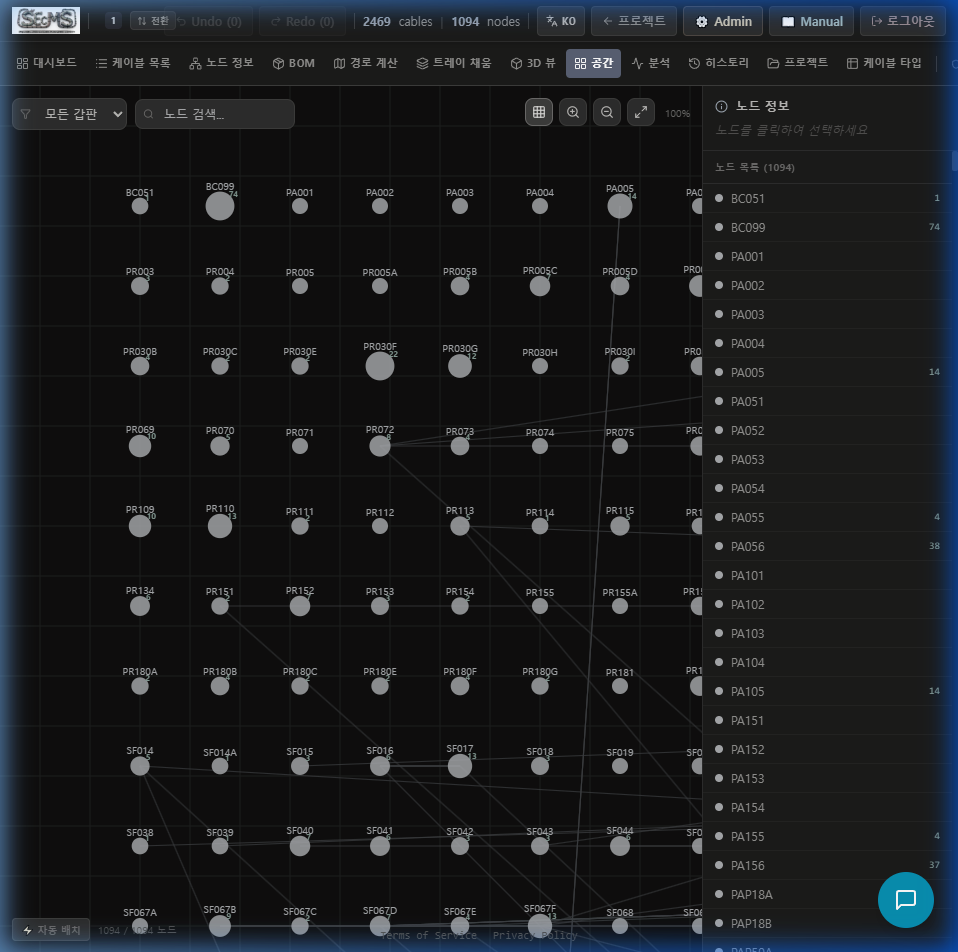
노드(Node)는 케이블 트레이 구간, 관통부, 기기 위치 등 선박의 물리적 위치를 나타냅니다. 노드 간 연결(RELATION)이 경로탐색의 기반이 됩니다.
Nodes represent physical locations: cable tray segments, penetrations, equipment positions. Node connections (RELATION) form the basis for path-finding.
자동 라우팅 엔진이 최적 경로를 찾습니다
Auto-Routing Engine Finds the Optimal Path
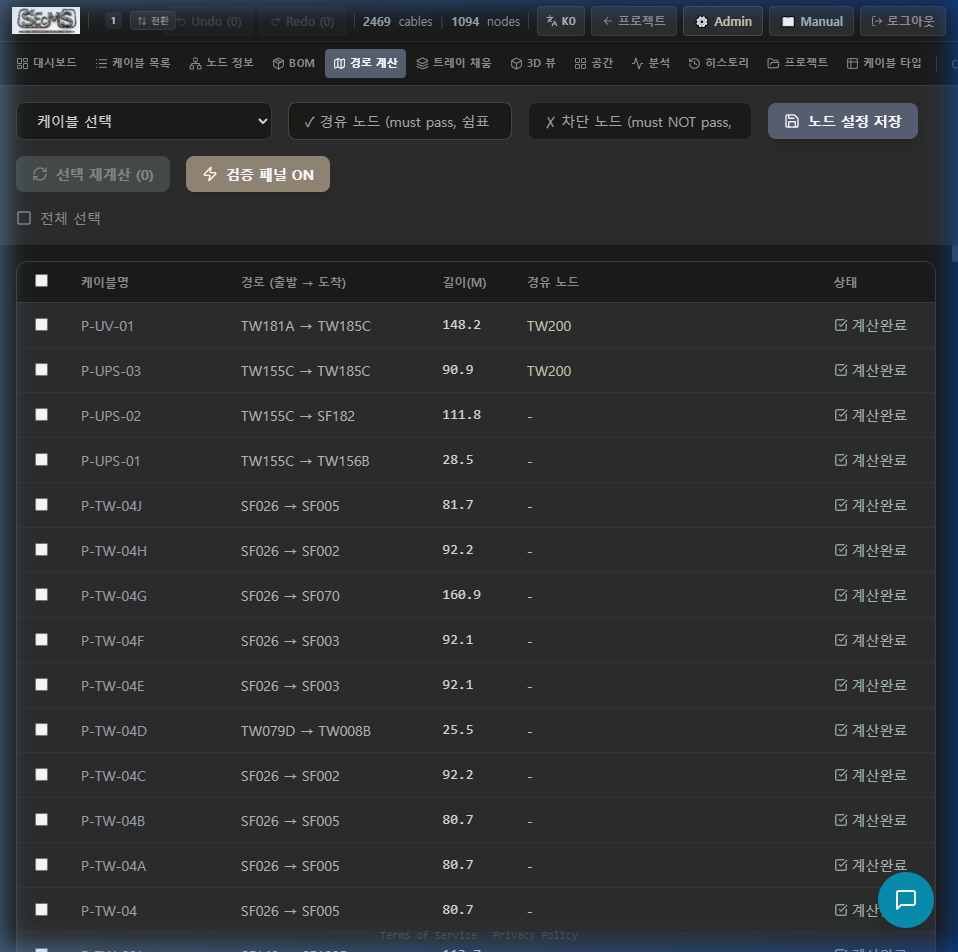
케이블 리스트의 FROM_NODE → TO_NODE를 최단경로 알고리즘으로 자동 탐색합니다. 대규모 호선도 빠르게 처리.
Automatically finds FROM_NODE → TO_NODE using shortest-path algorithm. Large-scale vessels handled quickly.
케이블 목록 탭에서 "전체 경로계산" 클릭
Click "Route All" in Cable List tab
또는 개별 케이블 행의 ▶ 버튼으로 단일 경로 계산.
Or click the ▶ button on a single cable row for individual routing.
경로 표시 확인
Verify Displayed Path
PATH 컬럼에 "ER-01 → DECK3 → PANEL-B" 형식으로 노드 경로가 표시됩니다. 계산된 길이(m)도 함께 표시.
The PATH column shows the node path: "ER-01 → DECK3 → PANEL-B". Calculated length (m) is also shown.
경로 없음 케이블 처리
Handle Cables with No Path
FROM/TO 노드가 연결되지 않으면 "경로 없음"으로 표시됩니다. 노드 RELATION 확인 후 재실행.
If FROM/TO nodes are disconnected, "No path" is shown. Check node RELATION and re-run.
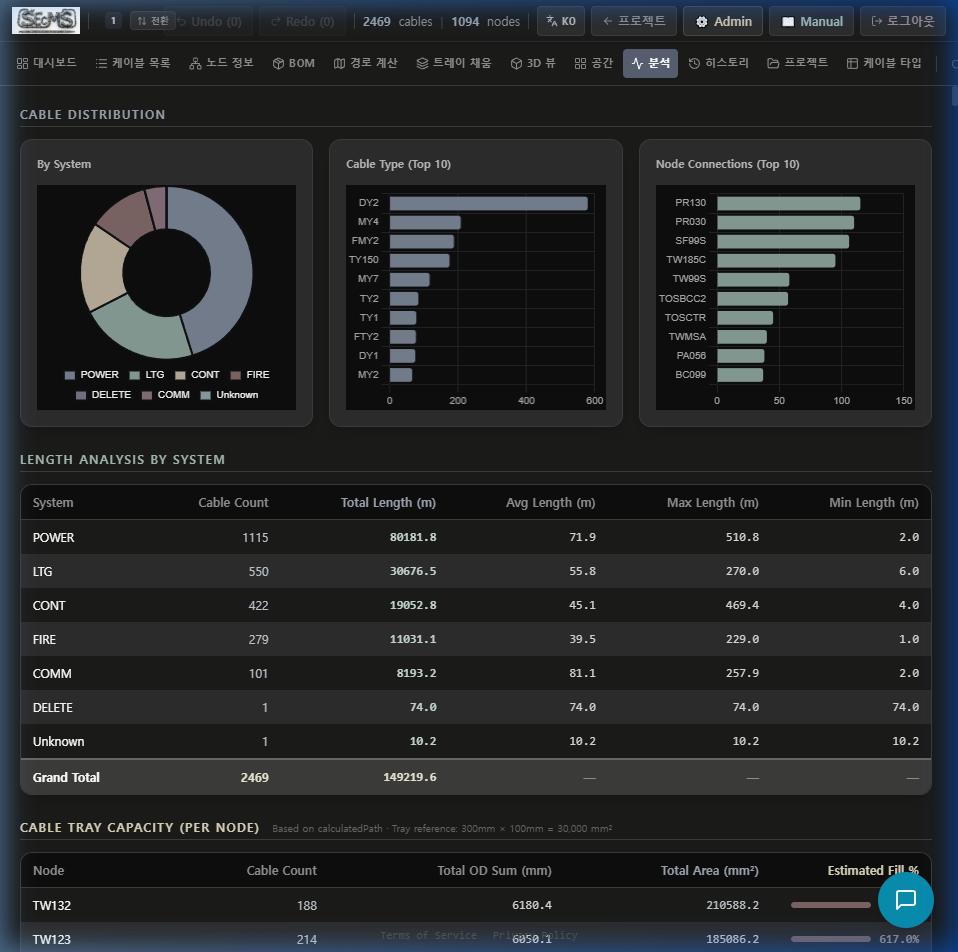
IEC 기준 충전율, 드래그로 배치 확인
IEC Fill-Rate with Drag-and-Drop Layout
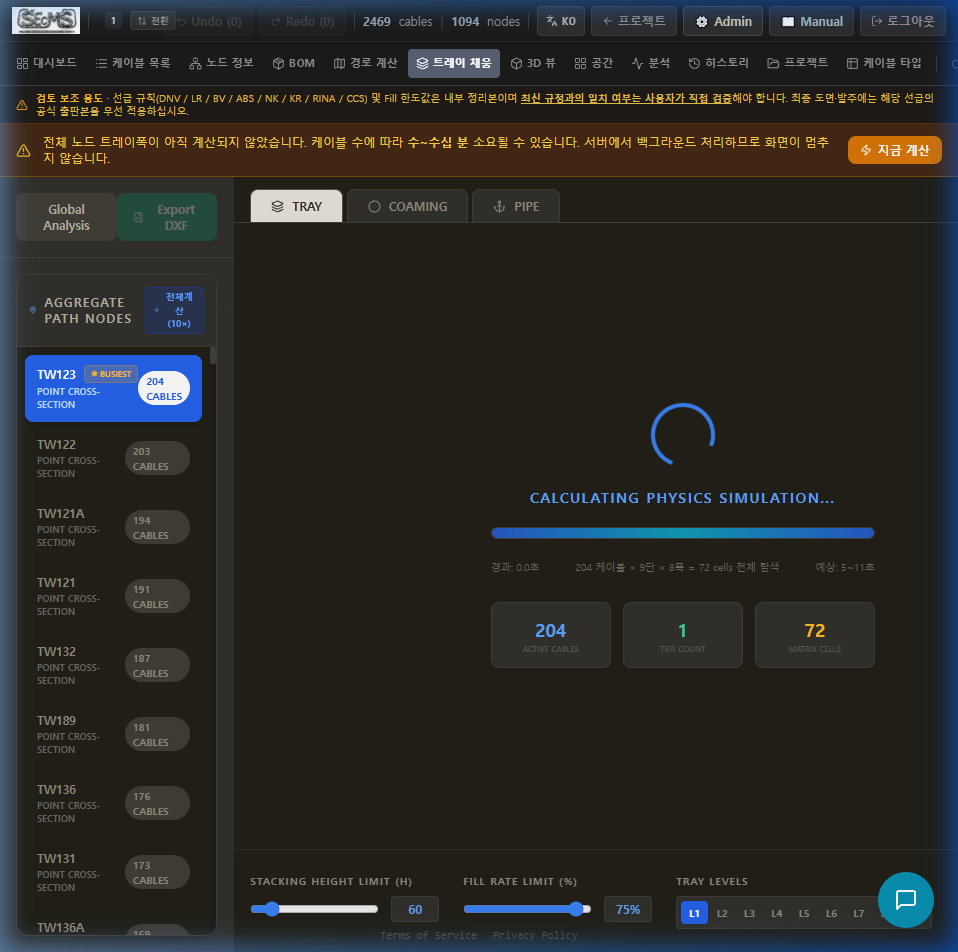
각 노드(트레이 구간)의 케이블 충전율을 IEC 60092 기준으로 자동 계산합니다. 드래그 배치 시뮬레이터로 물리적 공간도 확인 가능합니다.
Automatically calculates the cable fill rate for each node (tray segment) per IEC 60092. The drag simulator lets you verify physical space.
자동 충전율 계산
Auto Fill-Rate Calculation
트레이 폭·높이 입력 시 OD 기반 채움률 즉시 계산. 경고: 40% 초과 시 표시.
Enter tray width/height → instant OD-based fill calculation. Warning shown above 40%.
드래그 배치 시뮬레이터
Drag-and-Drop Simulator
케이블을 트레이 단면에 드래그하여 실제 배치를 시뮬레이션합니다.
Drag cables onto the tray cross-section to simulate actual layout.
BOM 연계
BOM Integration
트레이 계획 결과가 BOM 자재 산출에 자동 반영됩니다.
Tray planning results automatically feed into BOM material calculation.
발주서를 5초 만에
Material Orders in 5 Seconds
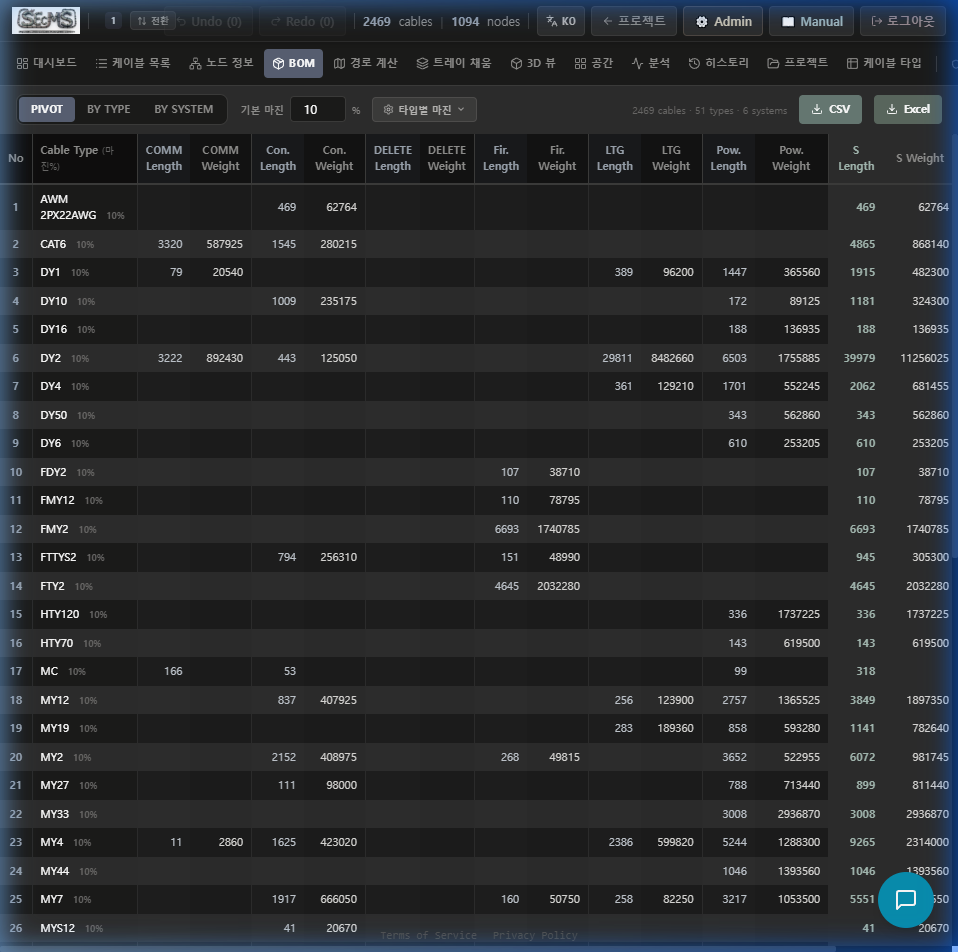
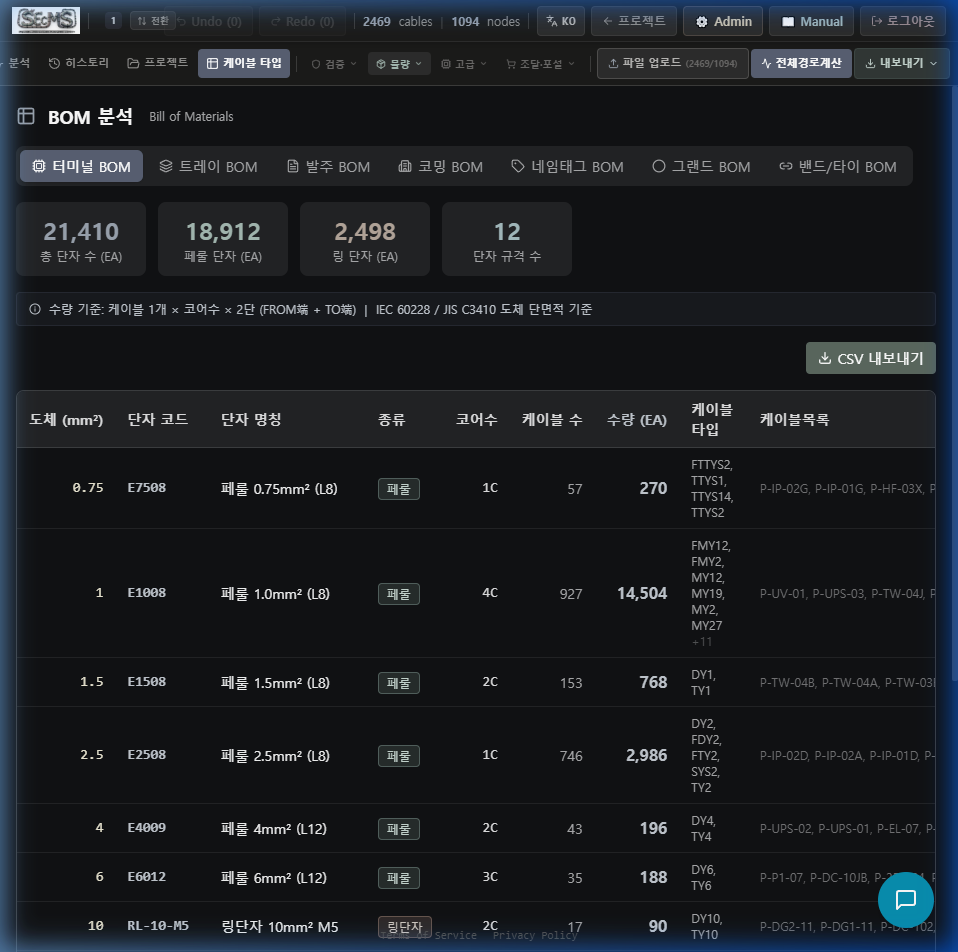
경로 계산 완료 후, BOM 탭에서 "BOM 생성" 클릭 한 번으로 케이블 자재발주서가 완성됩니다. Excel 또는 CSV로 다운로드 가능합니다.
After routing completes, click "Generate BOM" in the BOM tab — your material order is done. Download as Excel or CSV.
IEC 60092 자동 검증
IEC 60092 Auto Verification
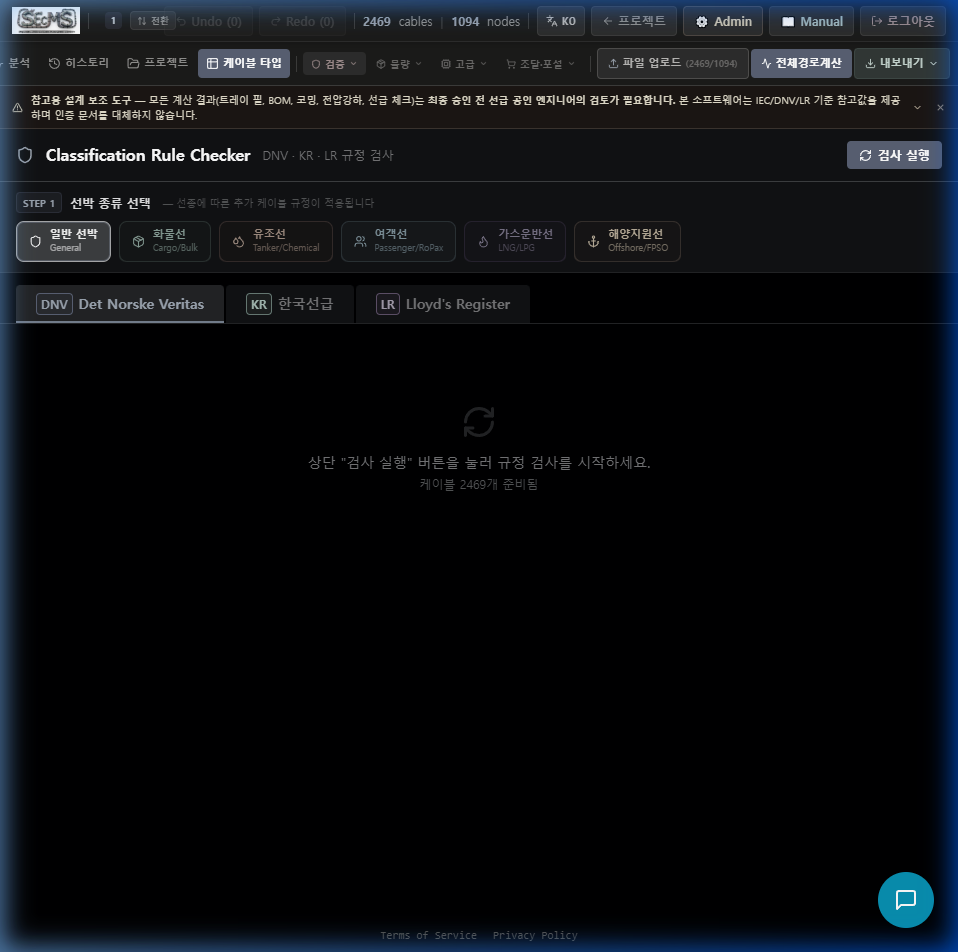
DNV·ABS·BV·LR·KR 규정이 내장되어 있습니다. "검사 실행" 클릭 시 전 케이블을 자동 점검하고 위반 항목 리포트를 생성합니다.
DNV·ABS·BV·LR·KR rules are built-in. Click "Run Check" and every cable is automatically inspected — violations are listed in a report.
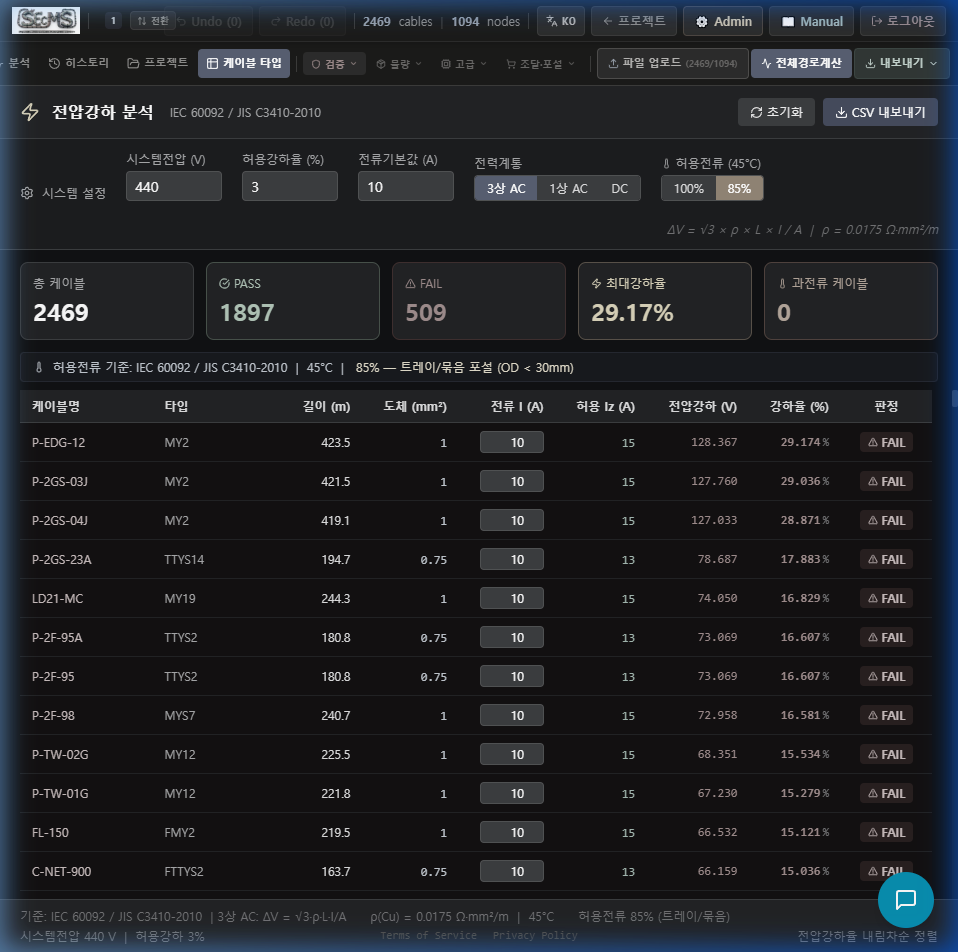
전압강하 검사
Voltage Drop Check
케이블 단면적·길이 기반 전압강하 계산. IEC 허용 범위 초과 시 경고.
Voltage drop calculation based on cable cross-section and length. Warning if IEC limit exceeded.
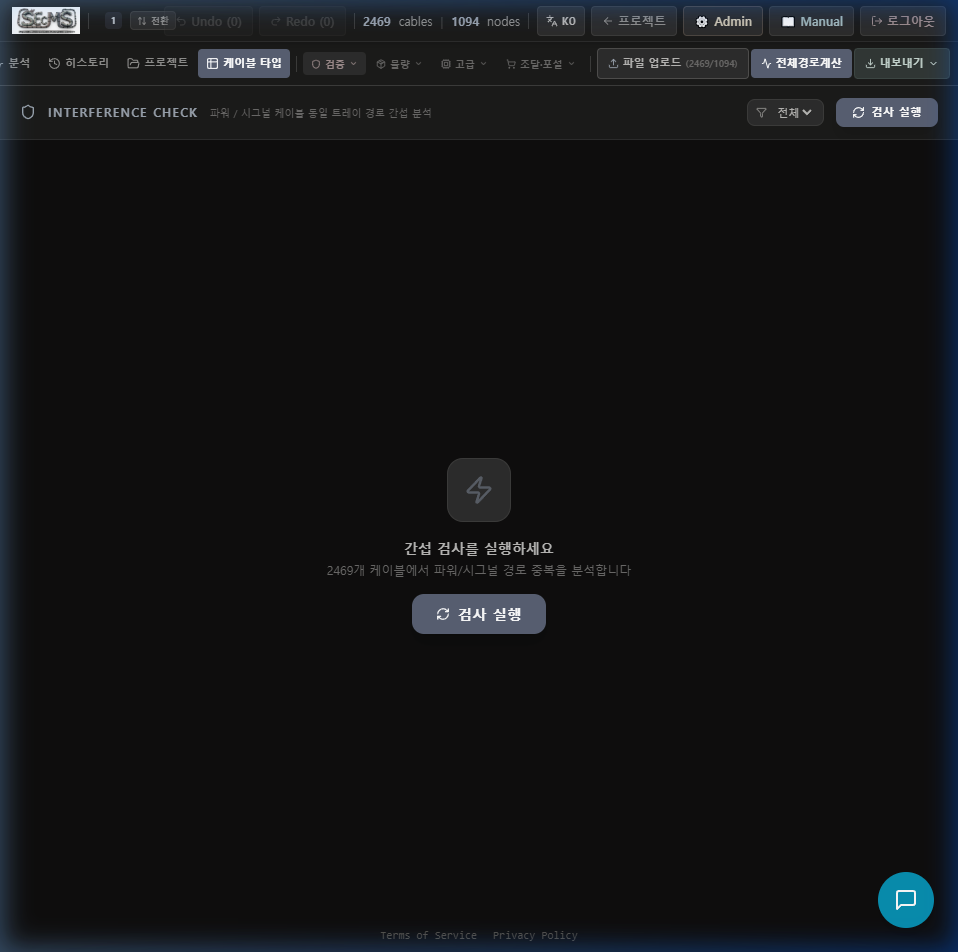
간섭 검사
Interference Check
전력·신호 케이블 동일 트레이 경유 여부 확인. 분리 요구 규정 적용.
Checks if power and signal cables share the same tray. Applies separation requirements.
보고서 출력
Report Export
위반 항목, 규정 근거, 권장 조치를 포함한 Excel 보고서 자동 생성.
Auto-generates Excel report with violations, rule references, and recommended actions.
케이블 트레이 3D 시각화
Cable Tray 3D Visualization
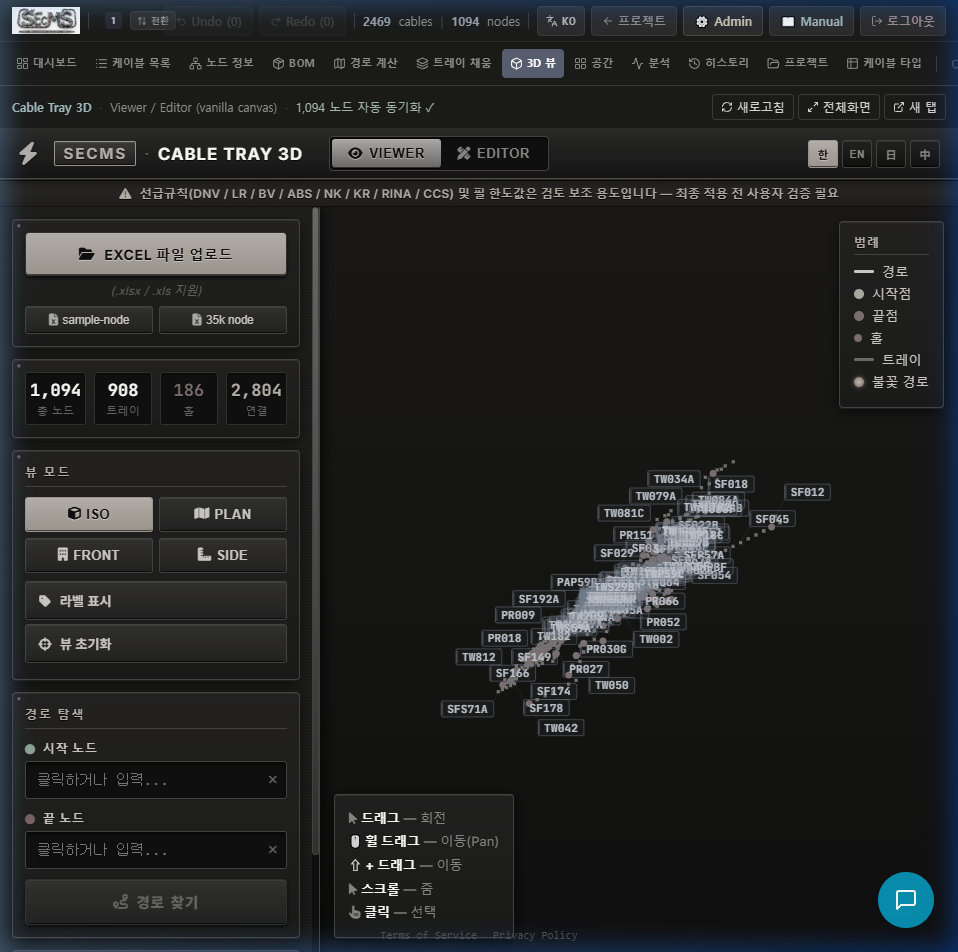
V2.0 NodeStandard3DMap은 Navisworks 스타일 Canvas 2D 렌더러로 35,000 노드까지 60fps 처리합니다. 헥사곤(Tray) · 다이아몬드(Hole) 아이콘, Fill 히트맵, 경로 파이어 이펙트, 4개국어(KO/EN/JA/ZH) UI 제공. V2.0 노드맵과 iframe(legacy) 뷰어를 토글 전환할 수 있습니다.
The V2.0 NodeStandard3DMap is a Navisworks-style Canvas 2D renderer handling up to 35,000 nodes at 60fps. Hexagon (Tray) + Diamond (Hole) icons, fill heatmap, fire-effect path, 4-language UI (KO/EN/JA/ZH). Toggle between V2.0 NodeMap and iframe (legacy).
3D → PLANT ROUTER 탭 → 좌측 사이드바 샘플 데이터 불러오기 (35k) 클릭 → Cloudflare R2에서 77KB 즉시 다운로드 → 1,057 노드 (908 Tray + 149 Hole) 렌더 완료. 실제 선박 스케일 258m × 61m × 30m. 3D → PLANT ROUTER tab → sidebar Load Sample Data (35k) → instant 77KB download from R2 → 1,057 nodes (908 Tray + 149 Hole) rendered. Real ship scale 258m × 61m × 30m.
뷰어 모드 — NavisworksViewer. 헥사곤 노드 + 경로 시각화 + Fill 히트맵.
️ 에디터 모드 — NodeEditorPanel. 그리드 스냅 · 노드 생성 · 연결 · 삭제 · Excel/DXF 내보내기. Viewer mode — NavisworksViewer. Hexagon nodes + path viz + fill heatmap.
️ Editor mode — NodeEditorPanel. Grid snap · create · connect · delete · Excel/DXF export.
샘플 데이터 1클릭
1-Click Sample Data
R2 저장 35k 노드 파일 즉시 로드. 신규 사용자 평가·데모에 최적.
Instant R2-hosted 35k node file load. Perfect for new-user eval and demos.
헥사곤 노드
Hexagon Nodes
Tray=육각형, Hole=다이아몬드. DECK 코드 + 번호 자동 분할 표시.
Tray=hexagon, Hole=diamond. Auto split DECK code + number display.
파이어 이펙트 경로
Fire-Effect Path
최단경로를 초록색 글로우·파이어 이펙트로 시각화.
Shortest-path with green glow · fire effect visualization.
Fill 히트맵
Fill Heatmap
트레이 충전율을 색상으로 3D 오버레이. >80% 빨강 · >60% 주황 · >30% 초록.
Tray fill ratio color overlay. >80% red · >60% orange · >30% green.
뷰 프리셋 4종
4 View Presets
ISO · PLAN · FRONT · SIDE 원클릭 전환. 드래그 회전, Shift+드래그 이동, 휠 줌.
ISO · PLAN · FRONT · SIDE one-click switch. Drag rotate, Shift+drag pan, wheel zoom.
DWG/PDF/DXF 오버레이
DWG/PDF/DXF Overlay
도면을 Z-레벨 지정 후 3D 오버레이. 투명도 · 레이어 개별 제어.
Overlay drawings at Z-level. Individual opacity · layer control.
4개국어 UI
4-Language UI
한국어 · English · 日本語 · 中文. 우측 상단 토글로 즉시 전환.
Korean · English · Japanese · Chinese. Top-right toggle, instant switch.
노드 에디터
Node Editor
DECK 코드 자동 번호, Tray/Hole 토글, 그리드 500mm 스냅, 근접 자동 연결.
Auto DECK numbering, Tray/Hole toggle, 500mm grid snap, proximity auto-link.
Excel/DXF 내보내기
Excel/DXF Export
편집한 노드를 XLSX + AutoCAD R12 호환 DXF로 즉시 내보내기.
Export edited nodes to XLSX + AutoCAD R12-compatible DXF instantly.
노드 샘플 (77KB, 1094 rows) · 케이블 샘플 (257KB, 35k) Node sample (77KB, 1094 rows) · Cable sample (257KB, 35k)
사용자·프로젝트·이메일 관리
User, Project & Email Management
사용자 관리
User Management
사용자 검색·권한 수정·계정 정지·삭제. 탭별 권한 개별 설정.
Search users, edit permissions, suspend/delete accounts. Per-tab permission control.
초대코드 발급
Invite Code Generation
티어별(Basic/Standard/Pro) 초대코드 생성. 코드 만료일·사용 횟수 설정.
Generate invite codes by tier (Basic/Standard/Pro). Set expiry and usage limits.
승인 관리
Approval Queue
신규 가입 신청 승인/거부. 미처리 건은 알림 배너로 표시.
Approve/reject new registration requests. Pending items shown in alert banner.
받은편지함
Email Inbox
[email protected]로 수신된 모든 메일을 패널 내에서 확인. Postmark Inbound 연동.
View all emails received at [email protected] directly in the panel. Powered by Postmark Inbound.
https://secms.pages.dev/api/admin/inbound-email으로 설정하세요. POSTMARK_WEBHOOK_TOKEN 환경변수 설정 필요.Email integration setup: Create an inbound server at [email protected] in Postmark, and set the Inbound Webhook URL to https://secms.pages.dev/api/admin/inbound-email. Set the POSTMARK_WEBHOOK_TOKEN environment variable.FAQ
Q. 초대 코드 없이 사용 신청하려면? Q. How do I request access without an invite code?
로그인 화면에서 Google로 로그인 → 승인 신청 완료. 관리자가 24시간 내 코드를 이메일로 발송합니다.
Sign in with Google on the login screen → complete the access request. Admin sends a code by email within 24 hours.
Q. 우리 회사 엑셀 포맷을 그대로 써도 되나요? Q. Can I use our company's existing Excel format?
네. 업로드 시 표준 헤더가 감지되지 않으면 컬럼 매퍼가 자동으로 열립니다. 한 번 매핑하면 프로필이 저장되어 다음 업로드에 자동 적용됩니다.
Yes. If standard headers aren't detected on upload, the Column Mapper opens automatically. Map once, save the profile, and it auto-applies on future uploads.
Q. 경로계산 결과에 "경로 없음"이 표시되는 케이블이 있어요. Q. Some cables show "No path found" after routing.
FROM_NODE 또는 TO_NODE가 노드 목록에 없거나, 두 노드 사이에 RELATION 연결이 끊어진 경우입니다. 노드 탭에서 해당 노드의 RELATION 컬럼을 확인하세요.
The FROM_NODE or TO_NODE is missing from the node list, or there's a broken RELATION connection between them. Check the RELATION column for those nodes in the Node tab.
Q. 동시에 여러 명이 같은 프로젝트를 편집하면 어떻게 되나요? Q. What happens when multiple people edit the same project simultaneously?
낙관적 잠금이 적용됩니다. 동시 저장 충돌 시 화면 상단에 배너가 표시되며, "강제 저장(내 변경 우선)" 또는 "서버 데이터로 새로고침" 중 선택할 수 있습니다. 이력은 자동 기록됩니다.
Optimistic locking is applied. On concurrent save conflict, a banner appears at the top. Choose "Force Save (keep my changes)" or "Reload from Server". History is automatically recorded.
Q. 폐쇄망(에어갭) 환경에서 사용 가능한가요? Q. Can SEcMS be used in air-gapped (closed-network) environments?
별도의 On-Premise(VPC 구축형) 버전을 제공합니다. 군함, 대형 조선소의 보안 요구사항에 맞게 구성됩니다. [email protected]로 문의하세요.
A separate On-Premise (VPC-deployed) version is available. Configured for naval and Tier-1 shipyard security requirements. Contact [email protected].
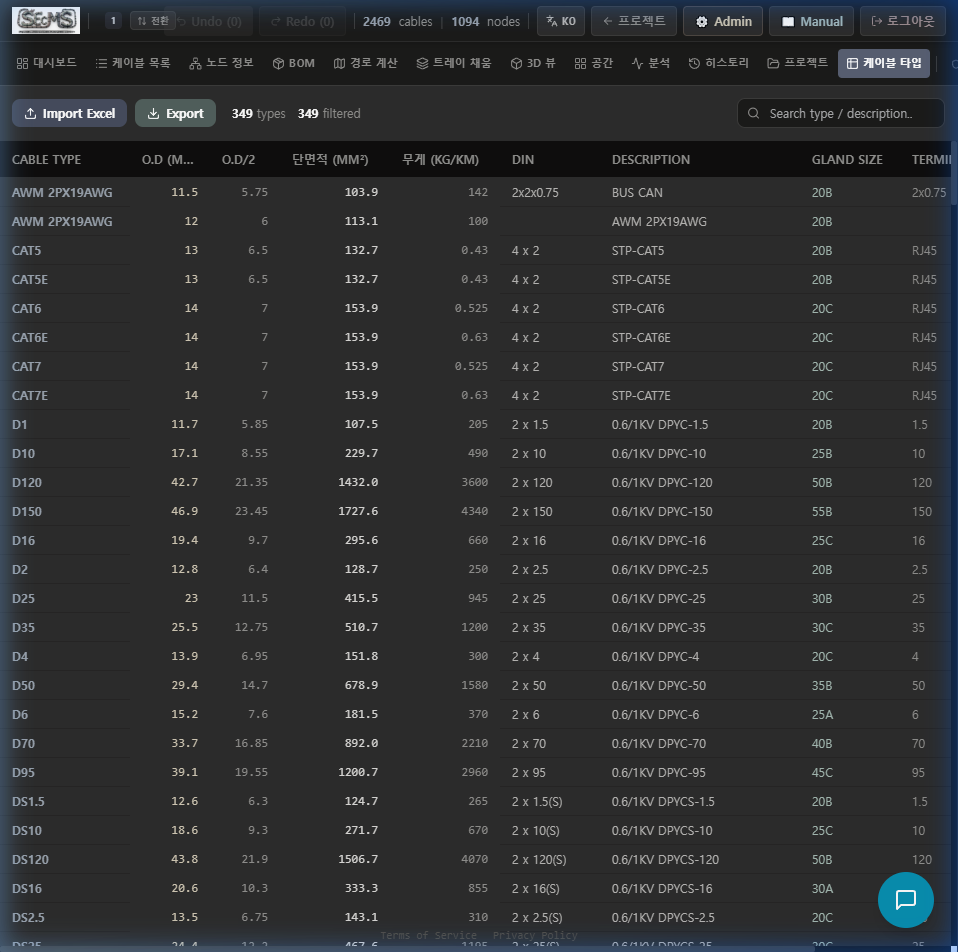
글로벌 표준 349종 보호 + 프로젝트 커스텀
349 Global Standards Protected + Per-Project Custom
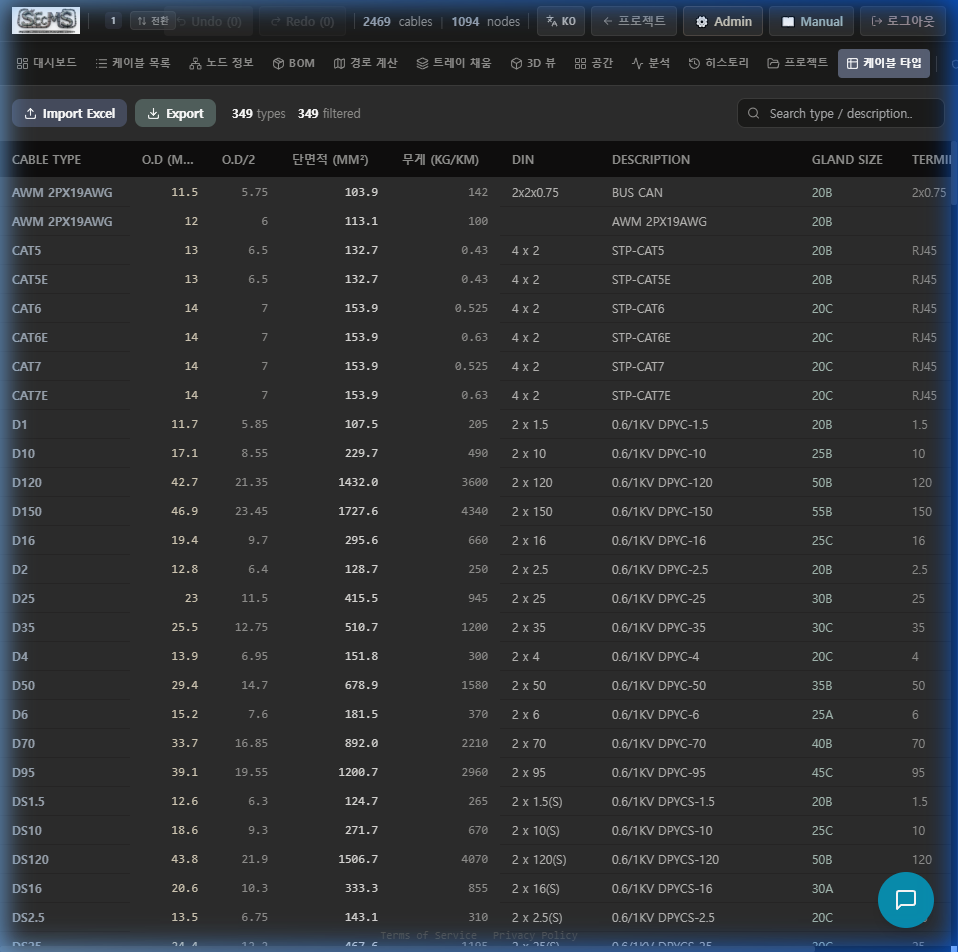
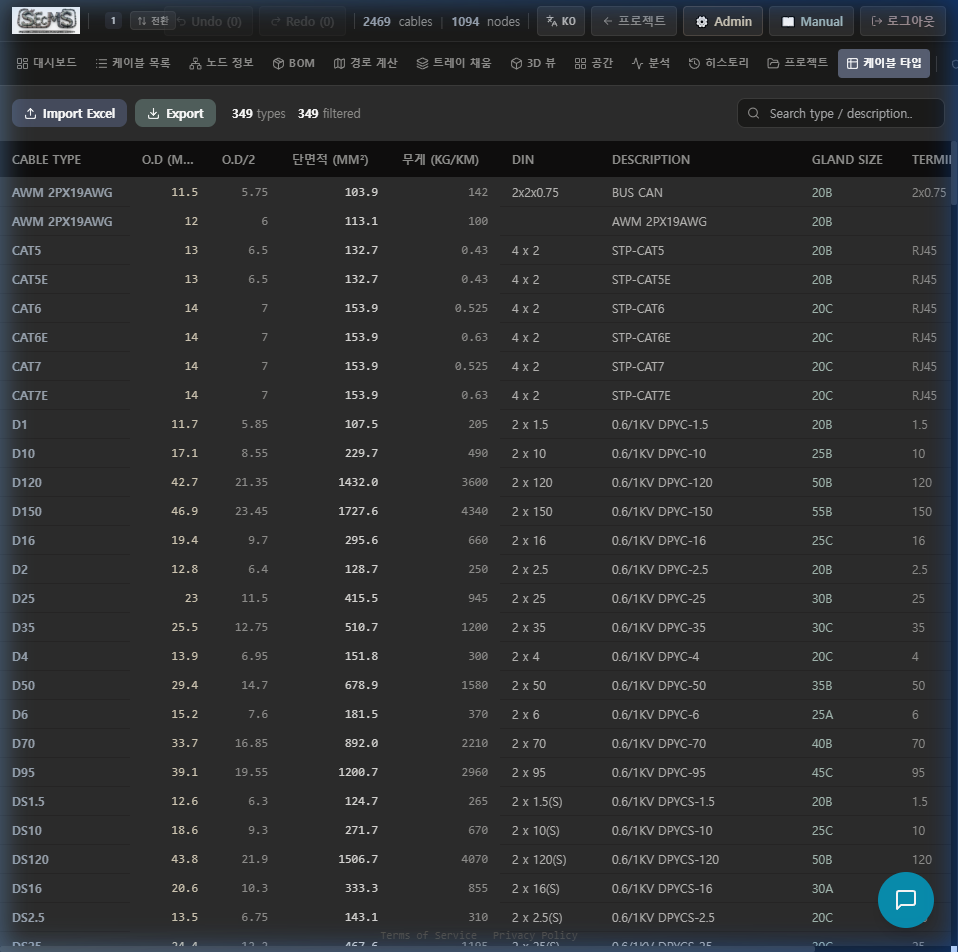
v3.6부터 케이블 타입이 글로벌(읽기전용)과 프로젝트 커스텀(편집 가능)으로 완전 분리됩니다. 서버 기준 데이터를 절대 훼손하지 않으면서 현장 특수 타입을 자유롭게 추가할 수 있습니다.
From v3.6, cable types are fully separated into Global (read-only) and Per-project Custom (editable). Server baseline data is never compromised while field-specific types can be freely added.
글로벌 타입 (349종)
Global Types (349)
DEFAULT_CABLE_TYPE_DB 기준. 수정·삭제·Excel 덮어쓰기 모두 차단. 행 앞에 아이콘 표시.
Based on DEFAULT_CABLE_TYPE_DB. All modification, deletion, and Excel overwrite blocked. Rows show icon.
️ 커스텀 타입 (프로젝트별)
️ Custom Types (per project)
Add Custom 버튼으로 현장 특수 타입 추가. 행 앞 버튼으로 개별 삭제. localStorage 저장.
Add custom types for field-specific cables via Add Custom button. Delete via button per row. Saved in localStorage.
Excel Import 정책
Excel Import Policy
Excel 가져오기는 커스텀 풀만 교체합니다. 글로벌 타입명과 충돌하는 항목은 자동 제외됩니다.
Excel import only replaces the custom pool. Items conflicting with global type names are automatically excluded.
scms_custom_cable_typesscms_cable_type_data → 자동 분리·전환Old scms_cable_type_data → auto-separated and migrated공급망 전 단계를 한 화면에서
Full Supply Chain in One View
SOURCING 그룹은 케이블 공급망의 전 단계(발주 → 포설 작업지시 → 실제 포설 → 종단 처리 → 재고)를 커버합니다. Termination 탭은 v3.6에서 고아 상태(접근 불가)에서 SOURCING 그룹으로 복귀되었습니다.
The SOURCING group covers the full cable supply chain (procurement → work order → installation → termination → inventory). The Termination tab was orphaned (inaccessible) and restored to the SOURCING group in v3.6.
Procurement — 발주/입고
Procurement — Orders & Receipt
공급업체별 발주 관리, 납기 추적, 입고 확인. BOM+와 연동하여 자동 발주서 생성.
Manage orders by supplier, track lead times, confirm receipts. Auto-generate orders linked to BOM+.
POS — 포설 작업 지시서
POS — Installation Work Order
작업자별 포설 지시서 발행. 케이블별 포설 순서, 경로, 담당자 배정.
Issue per-worker installation orders. Assign cable installation sequence, route, and worker.
Installation — 포설 현황
Installation — Status Tracking
케이블 포설 진행 상태 실시간 추적. 미포설/진행중/완료 필터. 작업자 배정.
Real-time cable installation progress tracking. Filter by pending/in-progress/complete. Worker assignment.
Termination — 종단 처리 v3.6 복구
Termination — Cable Termination Restored v3.6
케이블 양단 종단 처리 현황 관리. 글랜드 타입, 터미널 블록 배정, 완료 확인. v3.6에서 SOURCING 그룹 접근 경로 복구.
Manage cable-end termination status. Gland type, terminal block assignment, completion check. Access path restored to SOURCING group in v3.6.
Inventory — 재고 관리
Inventory — Stock Management
자재 재고 현황 대시보드. 부족 알림, 최소 재고 기준 설정, 사용 이력 추적.
Material stock dashboard. Shortage alerts, min stock level settings, usage history tracking.
Termination 탭은 AppTabBar.AdvancedMenuDropdown 에만 정의되어 있었으나 AppTabBar가 렌더링되지 않아 접근 불가(고아) 상태였습니다. v3.6에서 TopNavBar SOURCING 그룹에 직접 추가되어 모든 사용자가 접근 가능합니다. The Termination tab was defined only in AppTabBar.AdvancedMenuDropdown but became inaccessible (orphaned) because AppTabBar was not rendered. In v3.6 it was added directly to the TopNavBar SOURCING group, accessible to all users.
Vitest 단위 테스트 가이드
Vitest Unit Test Guide
SEcMS는 Vitest 기반 8개 테스트 파일 · 120+ 케이스를 갖추고 있습니다. 핵심 알고리즘(Dijkstra, 트레이 물리, BOM 집계, 전압강하, 결제 보안)이 모두 검증됩니다.
SEcMS ships with 8 Vitest test files covering 120+ cases across core algorithms: Dijkstra routing, tray physics, BOM aggregation, voltage drop, and payment security.
테스트 실행 명령
Run Commands
npm install 완료 후 실행. 테스트는 외부 API 호출 없이 순수 함수만 검증합니다 — D1/Firebase 연결 불필요.npm install first. Tests validate pure functions only — no D1/Firebase connection needed.테스트 파일 상세 (8개)
Test Files in Detail (8 files)
npx vitest run 실행 후 모든 테스트가 GREEN이어야 PR 병합 가능합니다. CI에서 자동 실행됩니다.npx vitest run before merging PRs. Runs automatically in CI.35,000 케이블 대용량 처리 검증
35,000-Cable Large-Scale Processing Verification
SEcMS의 Dijkstra 라우팅, 트레이 물리 계산, BOM 집계는 모두 클라이언트 브라우저에서 실행됩니다. 서버 부하 없이 35,000케이블을 30초 이내에 처리하는 것이 공식 성능 목표입니다.
SEcMS runs Dijkstra routing, tray physics, and BOM aggregation entirely in the browser. The official performance target is processing 35,000 cables in under 30 seconds — with zero server load.
공식 성능 수치
Official Performance Targets
️ 처리 단계별 시간 분포 (35K 기준)
️ Phase Timing Breakdown (35K cables)
35K 테스트 데이터 준비 방법
Preparing 35K Test Data
CABLE_NO, CABLE_TYPE, FROM_PANEL, TO_PANEL, CABLE_OD, SYSTEMNODE_NAME, RELATION (쉼표 구분), LINK_LENGTH(m), DECK, STRUCTURE브라우저 콘솔에서 성능 직접 측정
Measure Performance via Browser Console
케이블 35,000행 + 노드 1,000행 Excel 업로드
Upload Excel: 35,000 cable rows + 1,000 node rows
CABLE_NO 중복 없음, FROM_PANEL/TO_PANEL이 모두 NODE 목록에 존재하는지 확인
Ensure no duplicate CABLE_NO and all FROM/TO panels exist in node list
경로 계산 실행 → 30초 이내 완료 확인
Run routing → verify completes within 30 seconds
실패 케이블이 5% 미만이어야 정상 (RELATION 끊김 없는 데이터 기준)
Failed cables should be <5% (assuming no broken RELATION chains)
트레이 충전율 계산 → 표준 트레이 폭별 결과 확인
Run tray fill → verify results per standard tray width
IEC 기준 40% 충전율 이하 트레이 폭 자동 추천 확인
Verify IEC 40% fill-rate tray width recommendation
BOM 내보내기 → 케이블 타입별 총 수량/길이/중량 검증
Export BOM → verify total qty/length/weight per cable type
발주 수량 = 총 길이 × (1 + 마진%) → 드럼 단위 올림
Order qty = total length × (1 + margin%) → rounded up to drum unit
선급 규정 검사 → DNV/KR/BV/LR/ABS/NK 전체 통과 확인
Class rule check → verify pass across DNV/KR/BV/LR/ABS/NK
IEC 60092 전압강하 3% 이하, 트레이 충전율 40% 이하 기준
IEC 60092: voltage drop ≤3%, tray fill ≤40%
| 케이블 수 | Cable count | 노드 수 | Nodes | 예상 라우팅 시간 | Expected routing time | 권장 RAM | Recommended RAM |
|---|---|---|---|---|---|---|---|
| 1,000 | 1,000 | 1,000 | ~1s | ~1s | 8GB | 8GB | |
| 5,000 | 5,000 | 5,000 | ~3s | ~3s | 8GB | 8GB | |
| 15,000 | 15,000 | 15,000 | ~10s | ~10s | 16GB | 16GB | |
| 35,000 | 35,000 | 35,000 | <30s | <30s | 16GB+ | 16GB+ | |
| 50,000+ | 50,000+ | 50,000+ | ~60s+ | ~60s+ | 32GB | 32GB |
모든 변경사항의 완전한 기록
Complete Record of Every Change
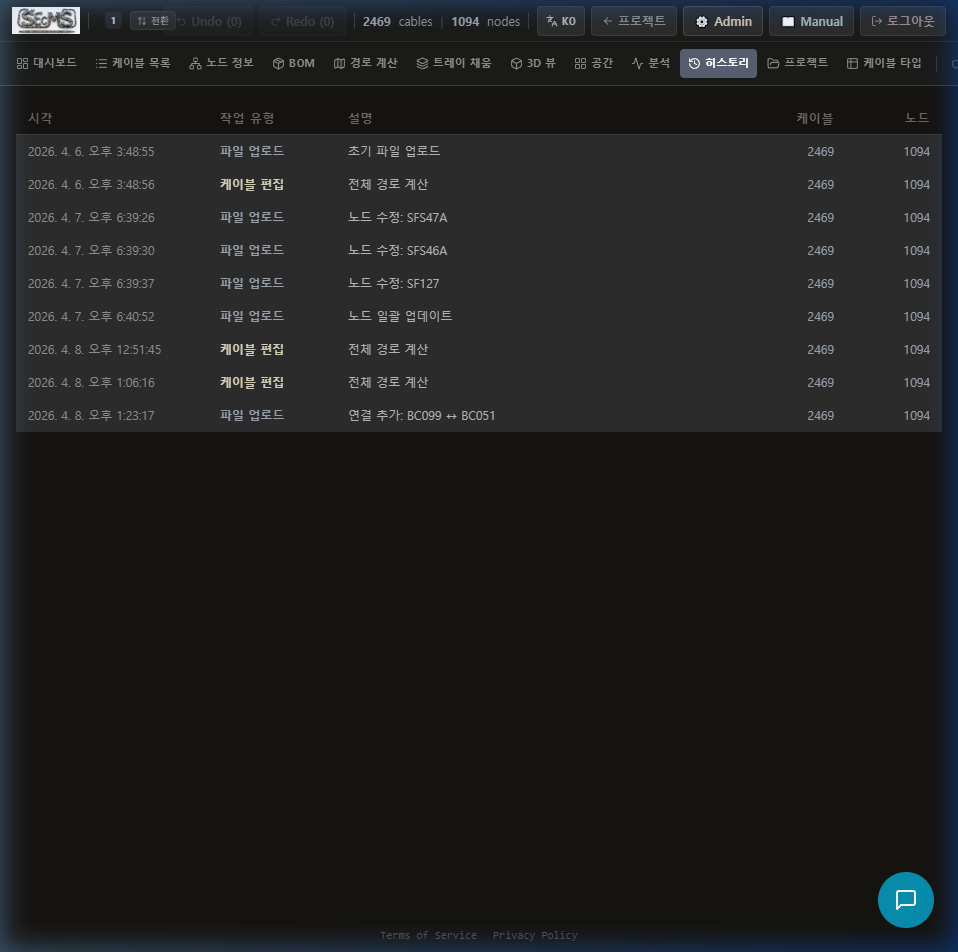
SEcMS는 케이블 편집·라우팅·BOM·드럼 할당·호선 등록·사용자 권한·그룹 변경 등 모든 주요 작업을 자동으로 기록합니다. 누가, 언제, 무엇을 변경했는지 언제든지 조회할 수 있습니다.
SEcMS automatically logs every significant action: cable edits, routing, BOM, drum assignment, vessel registration, user permissions, group changes, and more. Always know who changed what and when.
History 탭 — 스냅샷 복원
History Tab — Snapshot Restore
파일 업로드·경로 계산·케이블 편집·수동 저장·데이터 초기화 이벤트마다 스냅샷 자동 저장. [복원] 버튼으로 특정 시점으로 즉시 되돌리고, Ctrl+Z로 복원 취소 가능.
Auto-saves snapshots on file upload, routing, cable edit, manual save, data clear. [Restore] button reverts to any point instantly; Ctrl+Z undoes the restore.
서버 Audit Log — D1 영속 기록
Server Audit Log — D1 Persistent
모든 변경사항이 Cloudflare D1에 영속 기록됩니다. 90일 이후 R2로 자동 아카이브. Admin Panel → Audit History 탭에서 조회.
All changes recorded persistently in Cloudflare D1. Auto-archived to R2 after 90 days. View in Admin Panel → Audit History tab.
변경된 셀 컬러링
Changed Cell Highlighting
Cable List에서 변경된 셀은 노란색 배경으로 강조 표시됩니다. "변경된 것만 보기" 필터 토글로 변경 항목만 즉시 필터링.
Changed cells in Cable List are highlighted with yellow background. "Show changes only" filter toggle instantly filters changed rows.
| 기록 대상 | Logged Action | 기록 내용 | Record Content | 저장소 | Storage |
|---|---|---|---|---|---|
| 케이블 편집 | Cable edit | 변경된 필드명, 이전/이후 값, 케이블 ID | Field name, before/after value, cable ID | History Tab + D1 | |
| 파일 업로드 | File upload | 파일명, 케이블 수, 노드 수 | Filename, cable count, node count | History Tab + D1 | |
| 경로 계산 | Routing | 처리 케이블 수, 실패 수, 계산 시간 | Processed, failed, elapsed time | History Tab + D1 | |
| 재라우팅 | Re-routing | 대상 케이블 ID, 실행 사용자, 타임스탬프 | Cable ID, user, timestamp | D1 | |
| BOM 생성 | BOM generation | 타입별 집계 결과, 내보내기 형식 | Type aggregation, export format | D1 | |
| 드럼 할당 | Drum assignment | 드럼 번호, 케이블 수, 알고리즘 | Drum number, cable count, algorithm | D1 | |
| Fill 계산 | Fill calculation | 노드명, 충전율, 추천 트레이 | Node name, fill rate, recommended tray | D1 | |
| 권한 변경 | Permission change | 대상 사용자, 변경된 권한 목록 | Target user, changed permissions | D1 | |
| 그룹 변경 | Group change | 그룹명, 대상 사용자 수 | Group name, user count | D1 | |
| 호선 등록/삭제 | Vessel create/delete | 호선명, 선종, 실행 사용자 | Vessel name, type, user | D1 |
audit_logs 테이블의 90일 이전 레코드는 Cron Job이 자동으로 Cloudflare R2에 JSON으로 보관합니다. D1 용량 절감 + 영구 보관 동시 달성. Records older than 90 days in audit_logs are automatically archived to Cloudflare R2 as JSON by a Cron Job. Saves D1 capacity while retaining records permanently.
3단 게이트로 외부 AI 전송 차단
3-Gate System for External AI Transmission Control
SEcMS는 케이블 데이터가 외부 AI 서비스(Groq, OpenRouter 등)로 전송되기 전에 시스템 → 조직 → 개인 3단 게이트를 통과합니다. 조선소 기밀 데이터 보호를 위한 엔터프라이즈 필수 기능입니다.
Before cable data is sent to external AI services (Groq, OpenRouter, etc.), it passes through a System → Organization → User 3-gate check. An enterprise-grade safeguard for protecting classified shipyard data.
시스템 레벨 게이트
System-Level Gate
Admin → System Flags → AI_ENABLED 토글. OFF 시 모든 테넌트의 AI 기능 일괄 차단. 차단 배너: 🛡 빨간색.
Admin → System Flags → AI_ENABLED toggle. When OFF, all tenants' AI features are blocked. Banner: 🛡 red.
조직 레벨 게이트
Organization-Level Gate
Admin → 요금제 관리 → 회사별 AI 허용/차단. 민감 데이터를 취급하는 조선소 단위로 AI 전송 금지 가능. 배너: 🏢 주황색.
Admin → Pricing Plans → per-company AI allow/block. Block AI transmission for specific shipyards handling classified data. Banner: 🏢 orange.
개인 레벨 게이트
User-Level Gate
Admin → 사용자 권한 → 🤖 AI 외부 송신 체크박스. 특정 사용자만 AI 기능 허용/차단. 배너: 👤 파란색.
Admin → User Permissions → 🤖 AI External Send checkbox. Allow/block AI per individual user. Banner: 👤 blue.
자동 데이터 마스킹
Auto Data Masking
AI 전송 허용 시에도 AI_MASKING_ENABLED 플래그가 ON이면 호선명([VESSEL]), 조선소명([SHIPYARD]), 도면번호([DRAWING]), 이메일([EMAIL]), 전화번호([PHONE])를 자동 치환. 한국 주요 7개 조선소 패턴 내장.
Even when AI is enabled, if AI_MASKING_ENABLED is ON, vessel names ([VESSEL]), shipyard names ([SHIPYARD]), drawing numbers ([DRAWING]), emails ([EMAIL]), and phone numbers ([PHONE]) are auto-replaced. 7 major Korean shipyard patterns built-in.
AI 사용 감사 로그
AI Usage Audit Log
AI_AUDIT_ENABLED ON 시 모든 AI 호출(성공/차단)이 D1에 기록됩니다. 프롬프트 해시(SHA-256), 모델명, 응답 시간, 사용자 ID 포함.
With AI_AUDIT_ENABLED ON, every AI call (success/blocked) is logged in D1 with prompt hash (SHA-256), model name, response time, and user ID.
5분 캐시로 성능 보호
5-Min Cache for Performance
AI 게이트 체크 결과는 Worker 메모리에 5분간 캐시됩니다. D1 읽기 과부하 없이 고빈도 AI 호출에서도 빠른 응답 유지.
AI gate check results are cached in Worker memory for 5 minutes. Fast responses even under high-frequency AI calls without overloading D1.
S1001 표준 기반 드럼 할당 + 락 시스템
S1001-Standard Drum Assignment + Lock System
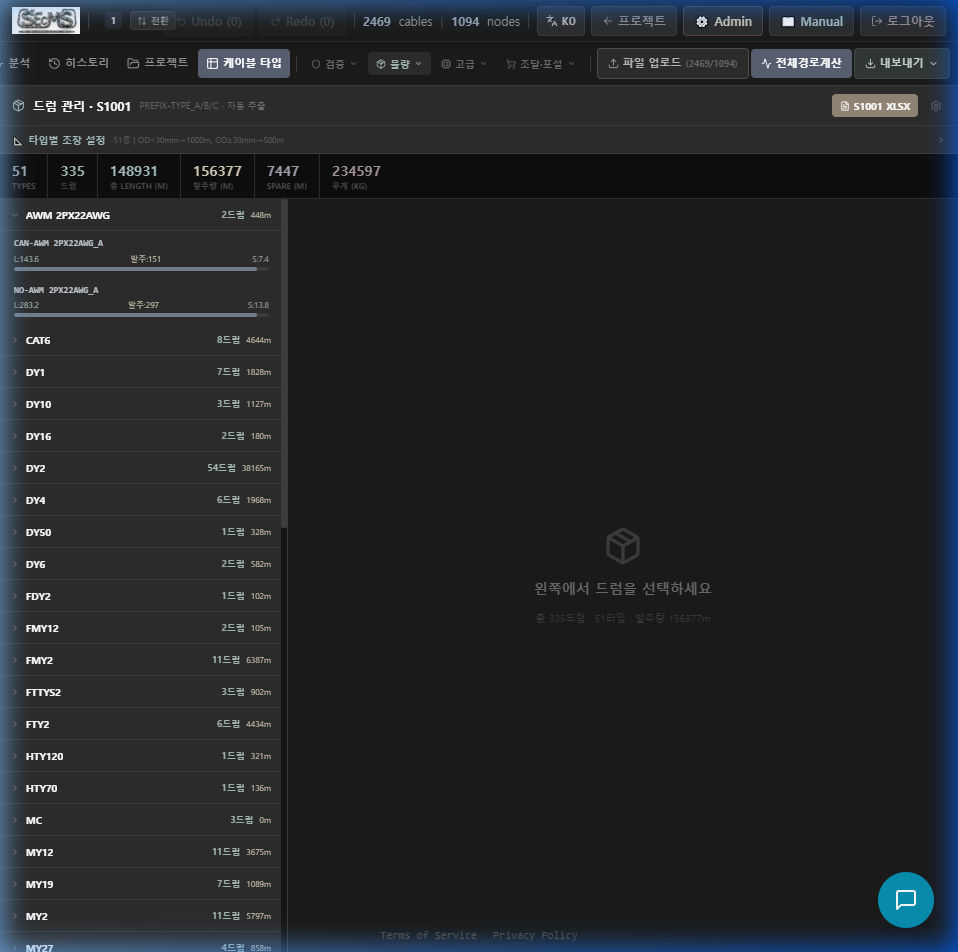
QUANTITY → Drum 탭은 S1001 표준 포맷으로 케이블 타입별 드럼을 자동 배정합니다. 확정(Lock) 후 수정 방지 시스템과 드럼 생성 옵션 모달로 조달팀 실무에 즉시 활용 가능합니다.
The QUANTITY → Drum tab auto-assigns drums per cable type in S1001 standard format. A Lock-after-confirm system and Drum Options Modal make it immediately usable for procurement teams.
설정 패널 (기본 펼침)
Settings Panel (Default Open)
마진율(%), 타입별 드럼 길이(m) 설정. 설정값은 localStorage에 자동 저장. 드럼 길이는 OD 기반 자동 계산 또는 사용자 직접 입력 우선.
Set margin rate (%) and drum length per type (m). Auto-saved to localStorage. Drum length: auto from OD or user input takes priority.
드럼 락 시스템
Drum Lock System
확정 버튼 클릭 → 모든 드럼 잠금(D1 영속). 잠긴 드럼은 수정 불가. 잠금 해제 요청 → 관리자 승인 필요. 재설정(Reset) 버튼으로 잠금 해제.
Clicking Confirm locks all drums (persisted in D1). Locked drums cannot be modified. Unlock request → requires admin approval. Reset button releases lock.
드럼 생성 옵션 모달
Drum Generation Options Modal
알고리즘(FFD/BFD/가중치 기반), 최대 드럼 길이, 마진율, 타입별 처리를 세밀하게 조정. "드럼 생성" 버튼 클릭 시 모달 팝업.
Fine-tune algorithm (FFD/BFD/weight-based), max drum length, margin rate, per-type handling. Opens via the "Generate Drums" button.
S1001 Excel 내보내기
S1001 Excel Export
조선소 표준 S1001 드럼 목록 포맷으로 Excel 다운로드. 드럼 요약(타입별 드럼 수, 총 길이)과 드럼별 케이블 상세가 분리된 시트로 제공.
Download as Excel in shipyard-standard S1001 drum list format. Drum summary (count/total length per type) and per-drum cable detail in separate sheets.
드럼 설정 파일 업로드
Drum Settings File Upload
이전 프로젝트의 드럼 설정(JSON)을 불러와 동일한 설정을 재사용. 같은 선종의 프로젝트에서 설정 복사 시 활용.
Import drum settings (JSON) from a previous project for reuse. Useful when copying settings across same vessel-type projects.
타입별 + 드럼별 뷰
Per-Type + Per-Drum View
좌측: 케이블 타입별 드럼 그룹(펼침/접기). 우측: 선택 드럼의 케이블 상세 목록. "타입 요약 보기" 버튼으로 타입별 OD·중량·개수 한눈에.
Left: cable type grouped drums (expand/collapse). Right: selected drum's cable detail list. "Type Summary" button shows OD/weight/count per type at a glance.
| 알고리즘Algorithm | 특징Characteristic | 적합 상황Best For | ||
|---|---|---|---|---|
| FFD (First Fit Decreasing) | 긴 케이블부터 배치. 드럼 수 최소화. | Longest cables first. Minimizes drum count. | 드럼 수 최적화 우선 | Minimize drum count |
| BFD (Best Fit Decreasing) | 잔여 공간이 가장 적은 드럼에 우선 배치. 잔량 낭비 최소. | Pack into drum with least remaining space. Minimize waste. | 잔량 최소화 우선 | Minimize leftover |
| 가중치 기반Weight-based | 중량 균형 우선. 포설 작업자 이동 하중 균등화. | Prioritizes weight balance. Evens worker load. | 포설 현장 작업 효율 | Field installation efficiency |
드럼 번호는 (1) Zustand 스토어 → (2) D1 API → (3) localStorage 순으로 폴백하여 네트워크 불안정 환경에서도 항상 표시됩니다. Drum numbers fall back through (1) Zustand store → (2) D1 API → (3) localStorage, ensuring they always display even in unstable network environments.
AutoCAD / ZWCAD / CADian 에 노드도구(LISP) 깔고 SEcMS와 연동하기
Install the LISP Node Tools in AutoCAD / ZWCAD / CADian and Sync with SEcMS
데스크톱 CAD에서 노드(POINT)·연결(NODE)·케이블 리스트를 그려 SEcMS 웹과 양방향으로 주고받습니다. 도구는 웹에서 zip으로 받아 1회 설치하면 도면 열 때마다 아이콘·메뉴·툴바가 자동으로 뜹니다.
Draw nodes (POINT), links (NODE) and cable lists in desktop CAD and exchange them both ways with the SEcMS web app. Download the toolkit as a zip from the web, install once, and the icons/menu/toolbar load automatically every time you open a drawing.
① 노드도구 다운로드
① Download the Node Tools
관리자 패널 → CAD 라이선스 토큰 화면의 “📦 노드도구(LISP) 다운로드” 버튼, 또는 아래 링크로 직접 받으세요.
Use the “📦 Download Node Tools (LISP)” button on the CAD License Token screen in the Admin Panel, or download directly below.
② 설치 (자동 — 권장)
② Install (Automatic — recommended)
zip 압축을 풀고 SECMS_INSTALL.bat 을 더블클릭하면, 발견된 모든 AutoCAD 프로필의 acaddoc.lsp 에 자동로드 블록이 등록됩니다(멱등·백업). 이후 도면을 열 때마다 도구가 자동 로드되고 아이콘·메뉴·툴바가 준비됩니다.
Unzip and double-click SECMS_INSTALL.bat. It registers an auto-load block into acaddoc.lsp for every AutoCAD profile found (idempotent, with backup). The tools then load automatically on every drawing open, with icons/menu/toolbar ready.
②′ 설치 (수동 — ZWCAD/CADian 등)
②′ Install (Manual — ZWCAD/CADian, etc.)
; CAD 명령행에서 / In the CAD command line
APPLOAD            ; SECMS_NODE.lsp 를 선택해 로드 / load SECMS_NODE.lsp
SCSTART ; 블록·레이어 + 메뉴 + 아이콘 툴바 한 번에 준비 / set up blocks, layers, menu, icon toolbar at onceSECMS_NODE.lsp 를 추가하세요.
SCSTART brings up both the icon toolbar and pulldown menu at once. For auto-load every time, add SECMS_NODE.lsp to your startup suite (STARTUP).
③ 라이선스 인증
③ License Activation
웹 SEcMS 로그인 → 관리자 패널 → CAD 라이선스 토큰 → 토큰 복사. CAD에서 SCLICENSE 입력 후 토큰을 붙여넣어 Enter(온라인 인증, 인터넷 없이 최대 7일 유예). 토큰 없이는 내보내기·편집·모델링이 차단됩니다.
Log in to SEcMS web → Admin Panel → CAD License Token → copy the token. In CAD type SCLICENSE, paste the token, press Enter (online activation, up to 7-day offline grace). Without a token, export/edit/modeling are blocked.
④ SEcMS 연동확인 · 데이터 상호교환
④ Connectivity Check & Two-way Data Exchange
SCNETPING          ; 서버 연동확인(라이선스 핑) — "연동 정상" 이면 OK / connectivity check; "connected" = OK
SCNETPUSH          ; 현재 노드망을 SEcMS 서버로 전송 / push current node network to the SEcMS server
SCCLEXPORT         ; 케이블 리스트를 SEcMS 케이블 그리드로 전송 / push cable list to the SEcMS cable grid
전송 후 웹 노드 에디터의 “📥 CAD 노드망(서버)” 버튼을 누르면 파일 업로드 없이 서버에서 바로 가져옵니다. 케이블 리스트는 케이블 목록 탭의 “📥 CAD에서 가져오기” 로 받습니다.
After pushing, click “📥 CAD Node Network (server)” in the web Node Editor to pull it straight from the server — no file upload. Cable lists are received via “📥 Import from CAD” on the Cable List tab.
주요 명령
Key Commands
SECMS_NODE_MANUAL.md 또는 CAD에서 SCMANUAL 명령으로 확인하세요.
For all commands/options see SECMS_NODE_MANUAL.md in the toolkit, or run SCMANUAL in CAD.